Products
Solutions
Resources


🚨 PagerDuty Integration
🚨 PagerDuty Integration for Topline Alerts
Statsig Topline Alerts can now page PagerDuty directly.
What you can do now
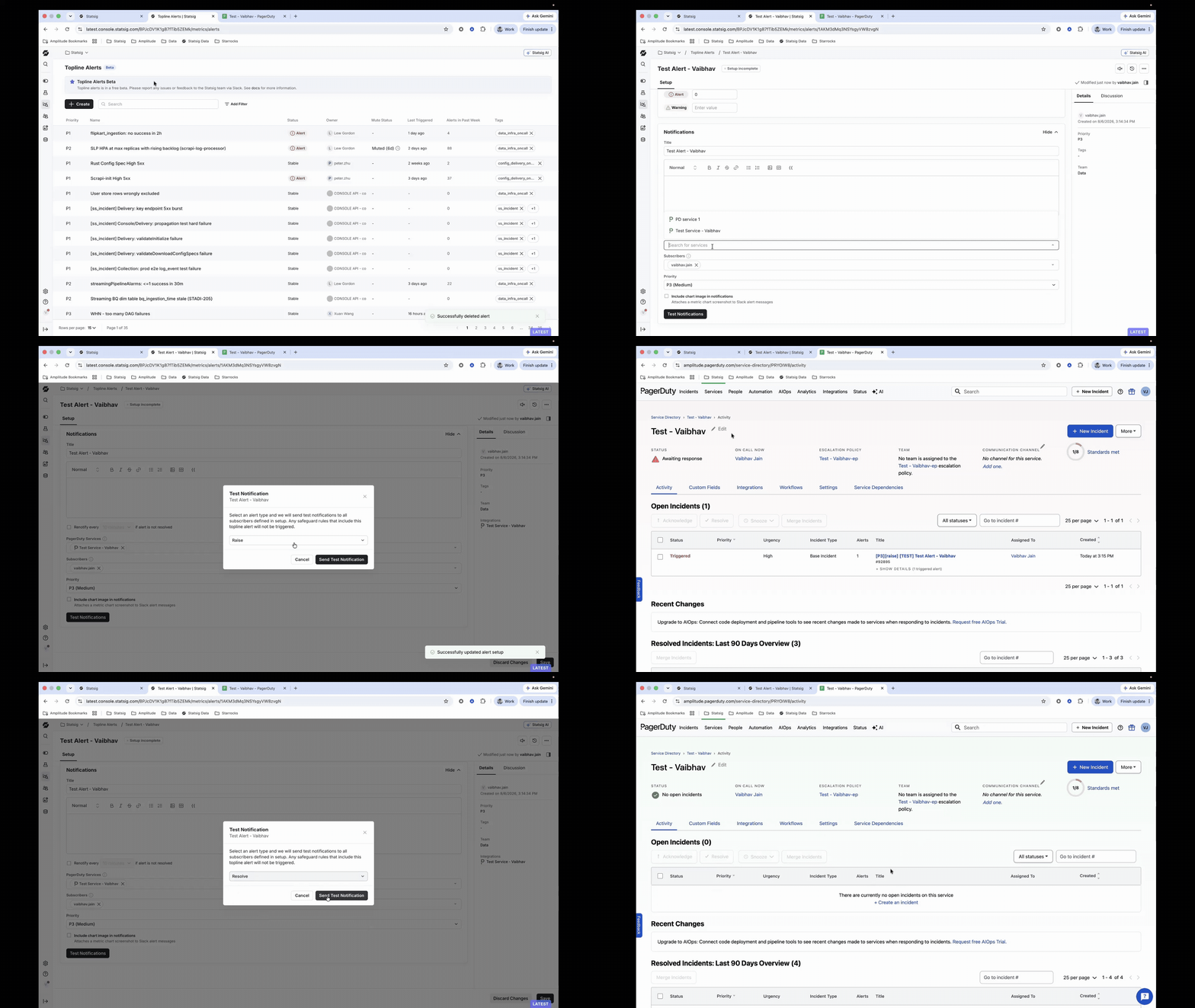
Add PagerDuty services to the Integrations catalog once with a name and Events API v2 routing key.
Select one or more PagerDuty services per alert in the Notifications settings.
Test your wiring end-to-end before you rely on it — test pages are tagged
[TEST]and never collide with real incidents.Deleting a PagerDuty service that an alert still references is blocked, and disabled integrations are clearly flagged.
Why this matters
Topline Alerts catch anomalies in your most critical product metrics, but a notification in Slack or email isn't always enough when something is on fire. Now, the same alert that fires in Statsig can page your on-call team in PagerDuty, closing the gap between detecting a problem and fixing it quickly.
Try it out
Go to Integrations in the Statsig console, add your PagerDuty service, then open any Topline Alert and configure PagerDuty under Notifications.
Learn more in the Statsig Topline Alerts docs.
Loved by customers at every stage of growth